
-
Booking & Buying
-
Payment & Signing
-
- What is eSPA?
- What is HIMS?
- Why do I need to sign through HIMS?
- Is eSPA legal?
- What do I need before I can sign the eSPA?
- What is iDSaya?
- How do I sign the eSPA?
- Can I still sign on paper?
- Is my data safe?
- When should I install the iDSaya and complete the eKYC?
- What should I do if I encounter issues with my iDSaya?
- For Foreigners or Individuals Without a Malaysian Mobile Number
- Show all articles ( 2 ) Collapse Articles
-
- What is SDP Quality Assessment Manual?
- What is it for?
- May I know what is the quality of the property that you are going to deliver to me?
- How do I use it?
- Is the SDP quality standard lower than industry standards?
- If I appoint my house inspector and the defects assessment done by the house inspector does not align with SDP’s manual, will SDP carry out the rectification works for such defects?
-
-
Development Progress
-
Handover & Key Collection
-
- When will I receive my Vacant Possession (VP) notice or letter?
- How do I book my key collection appointment?
- What should I do if the appointment system shows errors or wrong dates?
- Can I do walk-in for my property key collection appointment?
- Can I make key collection appointment if I have not yet received my VP notice or Clearance Letter?
- Can I request a special date/time for key handover due to travel or urgent reasons?
- Can someone else (family member/ representative) collect the keys on my behalf?
- What should I expect during key handover?
- What documents do I need to bring for key collection?
- Can I bring my family members during the key collection appointment?
- What happens if I show up late for my key collection appointment?
- Who should I contact if I cannot book or confirm my key collection appointment date?
- How do I reschedule my key collection appointment?
- Why is there no weekend slot for key collection appointment?
- How do I check if I am entitled to Liquidated Ascertained Damages (LAD)?
- Show all articles ( 5 ) Collapse Articles
-
-
Post-Handover Management
-
- What is Defect Liability Period (DLP)?
- When does the Defect Liability Period (DLP) start and end?
- Will my Defect Liability Period (DLP) start even if I haven’t picked up my keys yet?
- Can I renovate my property during the defect liability period (DLP)?
- What kinds of defects are covered under DLP?
- How do I report water leakage or flooding inside my home?
- What happen if I identify defects in my property outside or past the Defect Liability Period (DLP)?
- What quality standard can I refer to when checking for defects in my house?
- Where do I report the defects identified in my property?
- How do I submit defects reports after collecting the keys?
- How do I submit defects reports after collecting the keys of my new property?
- Who can submit the defect reports?
- Can I request the Township & Community Service (TCS) team to key in the defects in my property in the Sime Darby Property mobile mobile app or PRIME portal?
- How many defects submission can I send?
- How do I hand over my keys for defect rectification after submitting the defect reports?
- When will I get my keys back?
- How long will it take to fix reported defects?
- My defects were not rectified in 30 days. Can I hire my own contractor to rectify the reported defects?
- What should I do if there’s no update on my defect report?
- Will there be a joint inspection after the defects have been rectified?
- Can I move in or start renovations while defects are being rectified?
- Can I engage an external contractor to check defects?
- How can I start my new property or home inspection journey?
- Why is there no option/button for defect submission in the mobile app?
- Defect Status Glossary
- Show all articles ( 15 ) Collapse Articles
-
- My DLP expiry date in the mobile app is incorrect. How can I get it updated?
- I cannot submit my defect report in the Sime Darby Property mobile app. It keeps asking me to arrange a key handover, but I have already collected my keys. What should I do?
- Why is there no option/button for defect submission in the mobile app?
- I am the new owner of a property, but in the mobile app still shows the previous owner’s name. How do I update it?
-
- What is the procedure to apply for renovation? Do I need any forms?
- What is the difference between Minor and Major Renovation?
- How can I request for my house drawings (floor plan, piping, electrical, M&E, roof layout, etc.)?
- How do I find the paint colour codes, tile codes, and material specifications for my house?
- Where can I get my House Manual or SPA (Certificate of Completion & Compliance) documentation?
- How can I activate my house alarm system?
-
- How do I get a copy of important documents like CCC (Certificate of Completion & Compliance) or Borang F?
- How do I obtain my water bill or electricity bill account number?
- How do I know when water or electricity will be available at my unit?
- My utilities are still under Sime Darby Property’s name. How do I update them to mine?
- Why do I need to pay a deposit to TNB/Air Selangor when Sime Darby Property has already collected utility deposits earlier?
- Is internet (Unifi/Maxis/Time) available for my property, and how do I apply?
-
-
Living & Communities
-
- What should I do if streetlights or common area lights are not functioning?
- How can I request for landscaping maintenance (grass cutting, tree trimming, fallen trees)?
- Who is responsible for rubbish collection and what if it is not done on schedule?
- How do I report flooding or poor drainage in common areas (e.g. roadside drains, playgrounds, or walkways)?
- What should I do if I notice waste, debris, or blocked drains from construction works?
- How do I report pest or termite issues (including termite warranty)?
- Can residents use common facilities such as the gym, swimming pool, or parks?
- What do I do if I encounter damaged or unsafe infrastructure (e.g., drain covers, potholes, speed bumps, manholes)?
- Who do I contact regarding roadworks, traffic congestion, or township access issues?
-
-
App User Manual
-
Others
-
- I keep getting error codes (E.g., error 0, “Unit not ready for HOVP”) when trying to access my property page. How can I fix this?
- I cannot log in to the mobile app/portal. It says my IC number is already taken. What should I do?
- Can I add family members to access the property info in the mobile app?
- How can I update my personal details (e.g. name, contact number, email address, or mailing address) with Sime Darby Property?
- Who should I contact if I still face issues after troubleshooting?
Can I add family members to access the property info in the mobile app?
0 out of 5 stars
| 5 Stars | 0% | |
| 4 Stars | 0% | |
| 3 Stars | 0% | |
| 2 Stars | 0% | |
| 1 Stars | 0% |
We understand it’s convenient to share your property details with family members, and this feature will be available in the future update of the Sime Darby Property mobile app. At the moment, the function is not yet ready for all users, but rest assured, it will be made available in the coming updates.
Here’s how you can add your family members in the app, once the feature is updated:
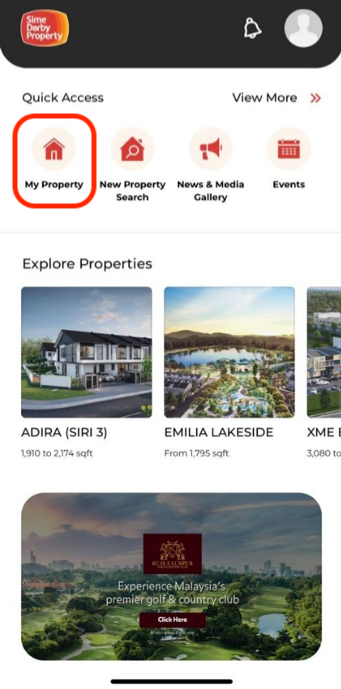
From the user’s homepage, select My Property.
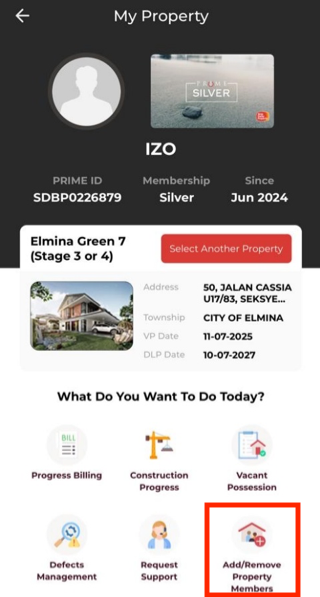
Tap Add/Remove Property Members at the bottom right of the app screen.
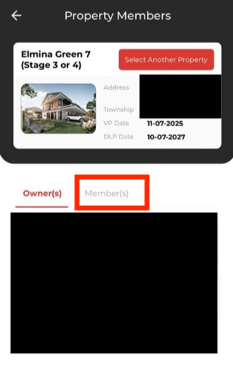
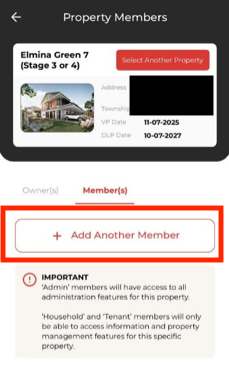
Go to the ‘Member(s)‘ tab and tap ‘+ Add Another Member‘.
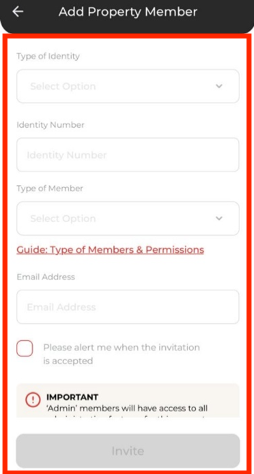
Fill in the member’s details and tap Invite.
Please note: This function is not yet available in the mobile app. The release date will be announced soon (TBA by Digital/ to be included or not in the FAQ).
0 out of 5 stars
| 5 Stars | 0% | |
| 4 Stars | 0% | |
| 3 Stars | 0% | |
| 2 Stars | 0% | |
| 1 Stars | 0% |