
How Can We Help You Today?
-
Booking & Buying
-
Payment & Signing
-
- What is eSPA?
- What is HIMS?
- Why do I need to sign through HIMS?
- Is eSPA legal?
- What do I need before I can sign the eSPA?
- What is iDSaya?
- How do I sign the eSPA?
- Can I still sign on paper?
- Is my data safe?
- When should I install the iDSaya and complete the eKYC?
- What should I do if I encounter issues with my iDSaya?
- For Foreigners or Individuals Without a Malaysian Mobile Number
- Show all articles ( 2 ) Collapse Articles
-
- What is SDP Quality Assessment Manual?
- What is it for?
- May I know what is the quality of the property that you are going to deliver to me?
- How do I use it?
- Is the SDP quality standard lower than industry standards?
- If I appoint my house inspector and the defects assessment done by the house inspector does not align with SDP’s manual, will SDP carry out the rectification works for such defects?
-
-
Development Progress
-
Handover & Key Collection
-
- When will I receive my Vacant Possession (VP) notice or letter?
- How do I book my key collection appointment?
- What should I do if the appointment system shows errors or wrong dates?
- Can I do walk-in for my property key collection appointment?
- Can I make key collection appointment if I have not yet received my VP notice or Clearance Letter?
- Can I request a special date/time for key handover due to travel or urgent reasons?
- Can someone else (family member/ representative) collect the keys on my behalf?
- What should I expect during key handover?
- What documents do I need to bring for key collection?
- Can I bring my family members during the key collection appointment?
- What happens if I show up late for my key collection appointment?
- Who should I contact if I cannot book or confirm my key collection appointment date?
- How do I reschedule my key collection appointment?
- Why is there no weekend slot for key collection appointment?
- How do I check if I am entitled to Liquidated Ascertained Damages (LAD)?
- Show all articles ( 5 ) Collapse Articles
-
-
Post-Handover Management
-
- What is Defect Liability Period (DLP)?
- When does the Defect Liability Period (DLP) start and end?
- Will my Defect Liability Period (DLP) start even if I haven’t picked up my keys yet?
- Can I renovate my property during the defect liability period (DLP)?
- What kinds of defects are covered under DLP?
- How do I report water leakage or flooding inside my home?
- What happen if I identify defects in my property outside or past the Defect Liability Period (DLP)?
- What quality standard can I refer to when checking for defects in my house?
- Where do I report the defects identified in my property?
- How do I submit defects reports after collecting the keys?
- How do I submit defects reports after collecting the keys of my new property?
- Who can submit the defect reports?
- Can I request the Township & Community Service (TCS) team to key in the defects in my property in the Sime Darby Property mobile mobile app or PRIME portal?
- How many defects submission can I send?
- How do I hand over my keys for defect rectification after submitting the defect reports?
- When will I get my keys back?
- How long will it take to fix reported defects?
- My defects were not rectified in 30 days. Can I hire my own contractor to rectify the reported defects?
- What should I do if there’s no update on my defect report?
- Will there be a joint inspection after the defects have been rectified?
- Can I move in or start renovations while defects are being rectified?
- Can I engage an external contractor to check defects?
- How can I start my new property or home inspection journey?
- Why is there no option/button for defect submission in the mobile app?
- Defect Status Glossary
- Show all articles ( 15 ) Collapse Articles
-
- My DLP expiry date in the mobile app is incorrect. How can I get it updated?
- I cannot submit my defect report in the Sime Darby Property mobile app. It keeps asking me to arrange a key handover, but I have already collected my keys. What should I do?
- Why is there no option/button for defect submission in the mobile app?
- I am the new owner of a property, but in the mobile app still shows the previous owner’s name. How do I update it?
-
- What is the procedure to apply for renovation? Do I need any forms?
- What is the difference between Minor and Major Renovation?
- How can I request for my house drawings (floor plan, piping, electrical, M&E, roof layout, etc.)?
- How do I find the paint colour codes, tile codes, and material specifications for my house?
- Where can I get my House Manual or SPA (Certificate of Completion & Compliance) documentation?
- How can I activate my house alarm system?
-
- How do I get a copy of important documents like CCC (Certificate of Completion & Compliance) or Borang F?
- How do I obtain my water bill or electricity bill account number?
- How do I know when water or electricity will be available at my unit?
- My utilities are still under Sime Darby Property’s name. How do I update them to mine?
- Why do I need to pay a deposit to TNB/Air Selangor when Sime Darby Property has already collected utility deposits earlier?
- Is internet (Unifi/Maxis/Time) available for my property, and how do I apply?
-
-
Living & Communities
-
- What should I do if streetlights or common area lights are not functioning?
- How can I request for landscaping maintenance (grass cutting, tree trimming, fallen trees)?
- Who is responsible for rubbish collection and what if it is not done on schedule?
- How do I report flooding or poor drainage in common areas (e.g. roadside drains, playgrounds, or walkways)?
- What should I do if I notice waste, debris, or blocked drains from construction works?
- How do I report pest or termite issues (including termite warranty)?
- Can residents use common facilities such as the gym, swimming pool, or parks?
- What do I do if I encounter damaged or unsafe infrastructure (e.g., drain covers, potholes, speed bumps, manholes)?
- Who do I contact regarding roadworks, traffic congestion, or township access issues?
-
-
App User Manual
-
Others
-
- I keep getting error codes (E.g., error 0, “Unit not ready for HOVP”) when trying to access my property page. How can I fix this?
- I cannot log in to the mobile app/portal. It says my IC number is already taken. What should I do?
- Can I add family members to access the property info in the mobile app?
- How can I update my personal details (e.g. name, contact number, email address, or mailing address) with Sime Darby Property?
- Who should I contact if I still face issues after troubleshooting?
Sign Up
0 out of 5 stars
| 5 Stars | 0% | |
| 4 Stars | 0% | |
| 3 Stars | 0% | |
| 2 Stars | 0% | |
| 1 Stars | 0% |
Objective: To sign up SDP App
Step 1
At the login page, user shall click “Login or Sign Up as a Guest”
User shall redirect to the login/ sign up page.
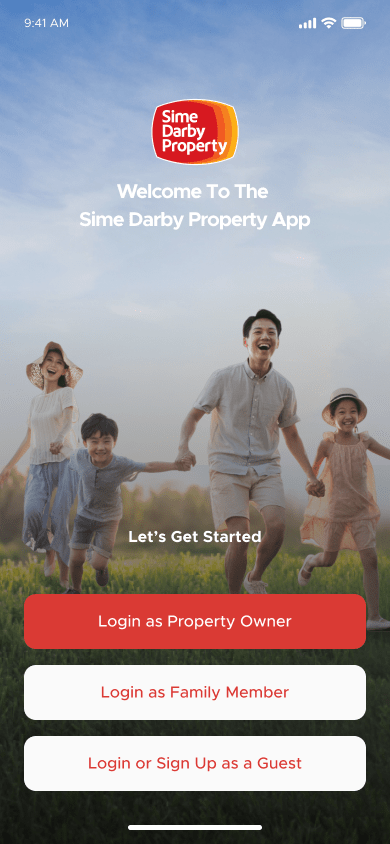
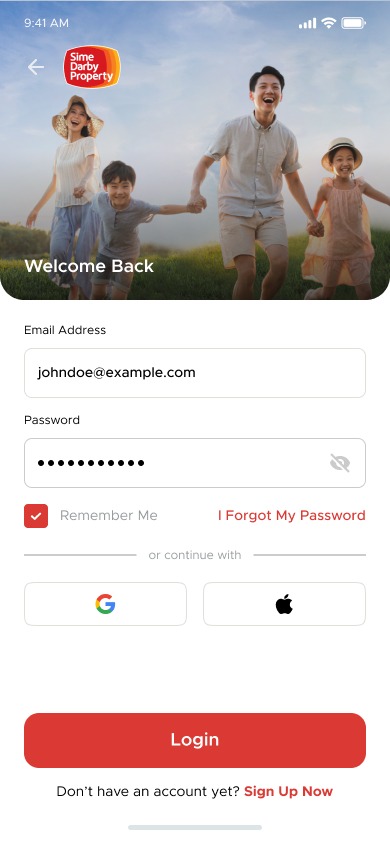
a. Click “Sign Up Now” at the bottom and user redirect to Sign Up page.
b. Fill in the sign up details and click [Sign Up]
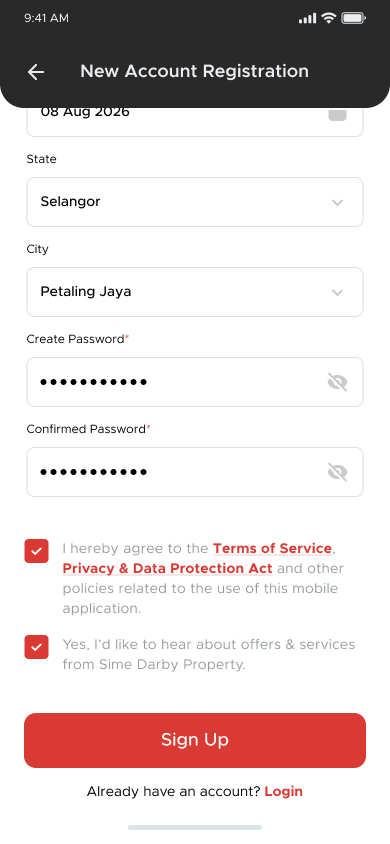
c. The reCAPTHCHA pop-up process will appear after user click [Sign Up]
d. After the reCAPTHCA process, user will go to the OTP page. Keyin the OTP from SMS and click [Verify OTP code]
e. user shall redirect login to the SDP App.
Was this article helpful?
0 out of 5 stars
| 5 Stars | 0% | |
| 4 Stars | 0% | |
| 3 Stars | 0% | |
| 2 Stars | 0% | |
| 1 Stars | 0% |
5